
- Contact Us
- Intro to Ecomm
- How-To Videos
- FAQs
- Release History
Easy. Efficient. Enhanced. Meet our NEW eCommerce system.
Introducing our eCommerce platform, which provides a simpler, more flexible way to complete online orders. Easy to use and offering enhanced search capabilities, our new system lets you create a “favorites” list of frequently placed orders AND gives you access to all your open orders and invoices. Now that’s efficiency.
With input from our reseller partners, we’ve designed our eCommerce platform to streamline your ordering process by listing accessory requirements, suggesting additional components, and applying special pricing to your online orders.
Check out our one-sheet that outlines our eCommerce and Account Management functionality HERE. You can find links to this Resources page from your Account dropdown menu on each page. We have HOW-TO-VIDEOS and FAQs as well as our RELEASE HISTORY of updates. You can also contact us with any questions using our FEEDBACK FORM.
Video Learning Library
-
Is there an e-commerce digital quick-help guide that I can share with my team?
-
How do I find my orders and invoices?
Hover over Account, then select the Order History drop-down. To view invoices, select the Invoices tab, then click on the invoice number of your choice, to bring up Invoice Details. To view orders, select the Orders tab, then click on the web order of your choice, to bring up Order Details.
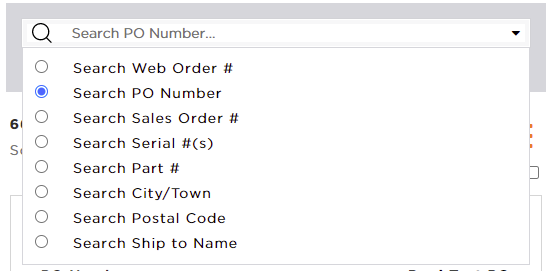
In the Order History section of your account tools, there are many different ways to search for orders. You can filter to a specific date range or select from the available order statuses on the left-hand panel. If you are searching for a specific order you can type it into the search field at the top and use the selector on the right side to specify what order # you are searching by. You can also use this option to search for specific devices (by Serial #) or parts or shipping locations.
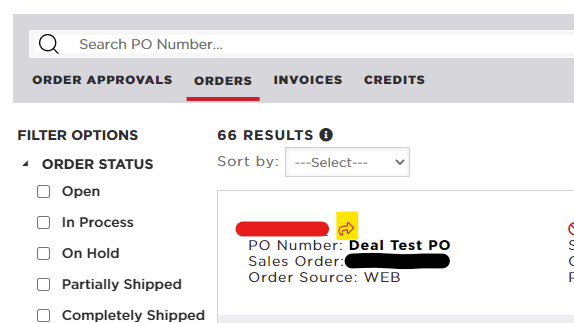
Another option that is available to you (if you know your order or invoice #) is to load the detail using a quick-link. These will follow the pattern www.scansource.com/order/[order#] or www.scansource.com/invoice/[invoice#]. You can also copy these from your order history section (using link highlighted yellow below) to send to other users in your organization.
-
Managing User Access
This is an admin-only role. Access My Account, then select the User Management drop-down. Select Manage Users. You can edit and/or delete a user.
You can find a guide to help with these activities here. -
How to Find Tracking Information
Access My Account, then select the Order Management drop-down. Select the Invoices tab, then click on the invoice number of your choice, to bring up Invoice Details. Select your tracking number. -
What can I do if there is not enough stock available for my order?
At ScanSource, our goal is to ensure we have stock on-hand to meet your needs. We know it’s important for you to have visibility into available inventory, so that you can better plan for your upcoming orders. In support of this, we have added links to the product information that will display not only current quantity available for you to order today, but also additional information on what we have in total stock and on order, with an easier way to contact our sales team about your specific inventory needs. We hope this will make the ordering process more seamless for you.
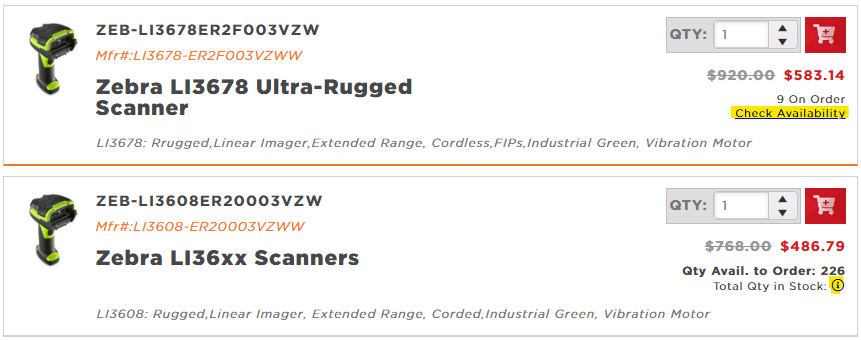
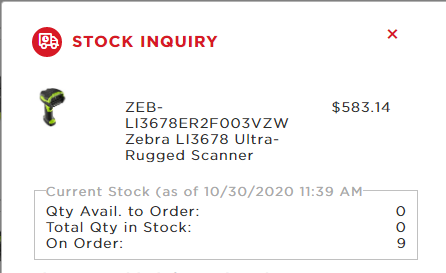
Clicking on one of the above highlighted links will pop up a form like the below that displays our stocking information. This pop up will also help you contact our team.
-
Can I save a cart or shopping list for later?
Once you have added products to your cart, we give you multiple ways you can save them for future use. All of these are available under the Cart Actions in the summary panel. This panel can be found on the right side of the screen in most web browsers, but will sometimes flow down to the end on tablet or mobile devices. You can hover over the Cart Actions link to view/select the Save Cart action for all of the following options.
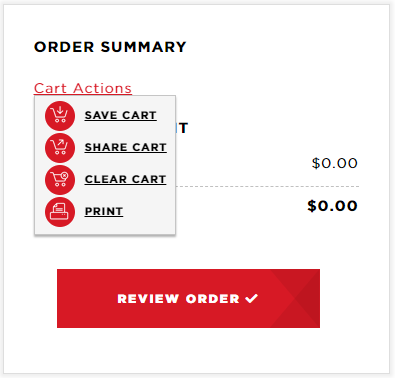
When saving your current cart, there are 2 different options you can select from. The first is to save it as a Shopping List, which will just keep the items in your cart, without the PO information and shipping address -- This can be useful to store a list of popular items for easy access and re-order in the future. The second option is to save as a Cart with all PO, shipping address/method and end-user data -- This can be useful if you need to get answers before ordering or just want to get ready for quoting or placing a future order for a customer. For either option, you will be asked to enter a name (and optional description) for the list, and these will be saved in the Carts and Lists section of your Account dashboard.
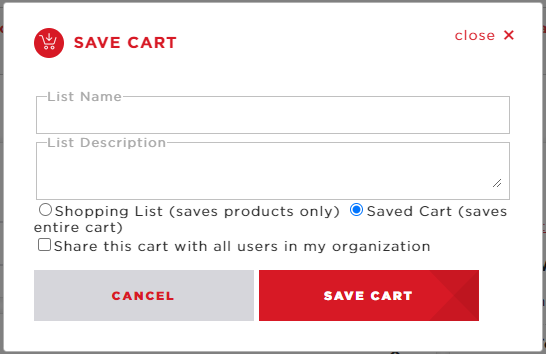
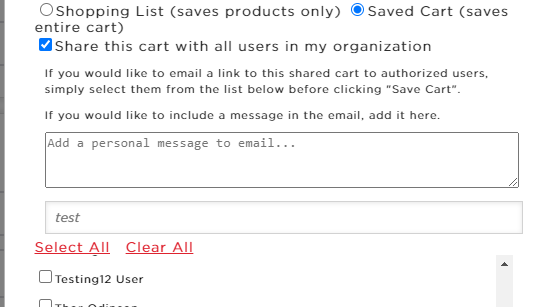
If you choose to save the entire cart, you will also have the option to share the cart with other users at your organization, or with your ScanSource sales representative. This can be useful to get questions adding or special pricing applied before placing the order. To do this, just check the [Share this cart ...] option before saving. When you share a cart, the system will ask if you wish to send an email (with link to cart) to any of the people linked to your account -- you are not required to select anyone to for notification in order to share a cart.
-
How can I report an issue or get help with a question that is not in this list?
We have a provided a Feedback Form under Account / Resources for you to contact us with any questions or issues that you have. If you are logged into the site your Customer# and name should auto-populate. Just enter the email address you would like us to respond to, select the type of issue you are seeing and provide some details about the issue. Selecting an issue type under [Need Help With] will help to ensure your issue gets directed to team that can best handle it. However, all of our teams work very closely to respond as quickly as possible to all requests. -
How to access Payment Portal
1. Login to E-Commerce
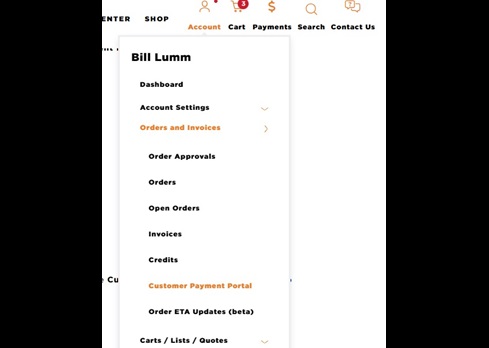
2. Click on Account then select Orders and Invoices and click on Customer Payment Portal
 c
c
3. You can also access this link under the Orders and Invoices view by clicking the Customer Payment Portal link at the top
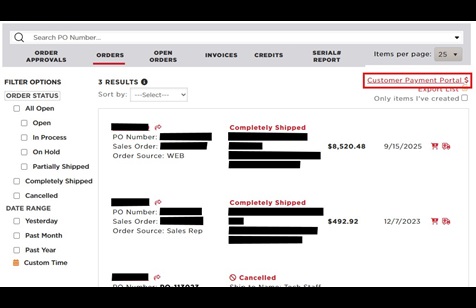
4. This will open a new tab with the Payment Portal
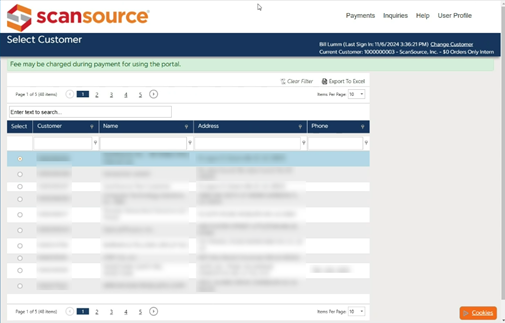
5. To access Invoices or Payment Methods, click Payments
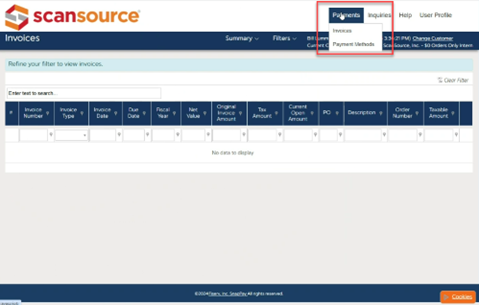
See more detailed instructions on how to add a new payment method here
-
2026-08-26
- Features
- Update Orders link on Dashboard - Based on customer feedback, the Orders and Invoices link on the Dashboard now opens Orders by default, not Invoices. Great for teams who usually check Orders first. No profile setting needed; we simply updated the dashboard link to point to the Orders view.
- Cisco Order Tracking link added - The Order Details page now includes a Cisco Order Tracking link below the Serial Number Report. This link opens a report in a new window (or tab) that provides the most up-to-date shipment and delivery information directly from Cisco.
- Features
-
2026-08-14
- Features
- Simplify Orders Widget - Based on user feedback, the order sorting dropdown has been restored, allowing users to sort orders by different criteria. Additionally, the "Open Orders Only" filter has been removed to simplify the experience and provide visibility into all orders within the widget..
- RMA Form Enhancements - Updated validation and guidance have been added to improve RMA submission accuracy. The Replacement Needed field is now only editable for Defective or Shipped Damaged return reasons. For non-serialized parts, return quantities cannot exceed the quantity originally purchased. Additionally, selecting Supplier/Distributor Error now displays a mis-shipment message directing partners to contact Customer Services for assistance.
- Features
-
2026-08-03
- Features
- Simplify Orders Widget - Customers using the Orders widget: “Open Orders” is now “Orders” and shows all orders, newest first. “Recent Invoices” is now “Invoices” and shows all invoices without date limits. This should make finding things easier. More simplifications are planned next.
- Issues with session timeout forcing login - Users may have seen a message asking if they were still active when their session timed out, but clicking Yes still required them to log in again. This issue has been resolved by updating the authentication configuration, and users should now be signed back in automatically when they choose to continue their session.
- Fixes
- Service products doubling in cart - In some cases, updating license quantities and continuing to shop could cause items in the cart to appear duplicated or out of order. This issue has been fixed, and the cart now displays items correctly after adding service products.
- Features
-
2026-07-23
- Features
- Request Order Review - Users can now request their order be reviewed before submission by checking the [Hold order for ScanSource Account Manager review] option in the cart.
- Deal picker updated in quote builder - The deal picker in the quote builder has been updated to search across all of the attributes of the deal (like supplier and end-user) to match the functionality on the product search and cart views.
- Features
-
2026-07-16
- Fixes
- Dashboard login display - Display updated on the dashboard to better show when a user is not logged in and provide a link to handle this login.
- Stability updates - Several updates done to help with speed and stability with account creation and login.
- Fixes
-
2026-07-07
- Features
- Discount added to SPA exports - The Discount off value is now included in all Special Pricing Agreement (SPA) exports that include a product list. This will allow you to better make purchasing decisions without having to come back into our system repeatedly.
- New SalesTools Menu - The menu that displays available product categories for quick loading of SalesTools has been changed from the glitchy flyout structure to a popup mega-menu to make it more useful and support use on a wider range of devices.
- Features
-
2026-06-11
- Features
- Tax displayed in Cart - Estimated sales tax is now automatically displayed in the cart once products are added and a shipping address is selected. This provides greater pricing transparency and accurate totals before placing your orders.
- New One-Click Quote Refresh - A new Quote Refresh action allows you to update pricing and expiration instantly—without opening the quote or creating a new version. You can click this from the quote list or detail view and use the new "Latest Pricing Updated" field to quickly see the last time a refresh was performed.
- Fixes
- Dashboard FAQ link - Fixed an issue that was occasionally causing users an error when clicking the Help/FAQ link from the dashboard -- it should now load reliably.
- Logging enhancements - Continuing to improve the logging and monitoring that we do on the website to avoid issues and identity and resolve them quickly when they happen.
- Quote Builder updates - More improvements to the quote builder -- in addition to usability and stability updates, there is better information provided for stock levels and better handling of products that are not authorized for quoting.
- Features
-
2026-06-02
- Features
- Updated Dashboard Layout - Partners on small screens and phones get a smoother dashboard. We revamped the layout to resize cleanly across devices, and tiles now switch to a mobile-friendly view by default, while desktop keeps the standard layout.
- Quote builder updates - Several updates were made to the quote builder to improve usability and handle edge-cases like creating quotes from a Special Pricing Agreement that does not have any specific products.
- Fixes
- Expired SPA details showing - If expired versions of active Special Pricing Agreements (SPAs) existed, they were sometimes showing in the detail view when a SPA was auto-loaded from an email link. This has been resolved so the most current information is displayed.
- Features
-
2026-05-22
- Features
- Updated Dashboard Layout - Partners on small screens and phones get a smoother dashboard. We revamped the layout to resize cleanly across devices, and tiles now switch to a mobile-friendly view by default, while desktop keeps the standard layout.
- Quote builder updates - Several updates were made to the quote builder to improve usability and handle edge-cases like creating quotes from a Special Pricing Agreement that does not have any specific products.
- Fixes
- Expired SPA details showing - If expired versions of active Special Pricing Agreements (SPAs) existed, they were sometimes showing in the detail view when a SPA was auto-loaded from an email link. This has been resolved so the most current information is displayed.
- Features
-
2026-05-07
- Features
- Consolidated Quote Builder - Creating and managing quotes just got a whole lot easier. With our new Consolidated Quote Builder, you can quickly generate a new quote directly from a Special Pricing Agreement (SPA) or update an existing quote to include additional products and deals—all in one streamlined experience. Spend less time jumping between quotes and more time closing opportunities with a faster, more flexible way to build and manage your deals..
- Add support for downloading multiple SPAs with detail - For customers managing Special Pricing Agreements you can now select multiple entries from the dashboard widget and export their full details to Excel at once. After filtering to the list you want, pick the ones you want and click Download Selected, and we’ll bundle multiple files into a single ZIP for easy sharing.
- Add MSRP and Discount % to products list of SPA detail - We added MSRP and Discount % columns to the SPA product list and export, right after Price columns to help users who need to do pricing based on discount off list price.
- Features
-
2026-04-23
- Fixes
- Expiration date format fixed in SPA exports - Anyone exporting the product list from Special Pricing Agreements (SPAs) will now see the expiration dates in a proper format where they were previously getting mangled.
- Control MFA in account admin - Internal account managers now have the ability to enable or disable MFA for a user in the account admin form.
- Fixes
-
2026-04-03
- Fixes
- Updated ESD Styling - Anyone viewing order details or receiving delivery ETA emails will now see future dates and their note in black, not red. We have also made the note at the bottom of order details clearer and more concise.
- Enhanced Application Logging - We have enhanced our website monitoring to detect issues faster and gain better insight, so we can respond more quickly and keep things running smoothly for you.
- Fixes
-
2026-03-19
- Fixes
- PO values in CCC Tracker - There was a issue that was keeping the PO from being properly displayed in the CCC Tracker widget and views. Because of this, any searches by PO were also not returning orders. This has been resolved so this highly-used filter can effectively be applied.
- Better check for SPA max quantities - When multiple Special Pricing Agreements exist with the same deal ID and products on those deals have a max quantity, the user was not always getting alerted when the remaining quantity is exceeded. We have updated this check so that users have better alerts when orders need adjusted to work with these pricing agreements.
- Fixes
-
2026-03-12
- Features
- Product Descriptions in SPA Details - The Product lists in Special Pricing Agreement (SPA) details now include a Material Description column. This description is also included in the full or product list exports from this view.
- Features
-
2026-03-08
- Features
- Delivery Document in CCC Tracker - Shoppers using the CCC Tracker on their dashboard can now see (and export) the Delivery Document number in the list as well as in the detail popup for each order.
- Features
-
2026-03-02
- Features
- Update search and display of Deal Picker - Shoppers on the Shop and Cart pages can now browse and search SPA deals by Deal ID, expiration, MFG code, and End-User— just like the SPA widget. Easier picking, better results. We also unified the display template for a consistent experience.
- Allow expanding SPA detail to full-screen - For teams working with Special Pricing, the window now supports Maximize. Pop it full-screen to view more lines at once—no more exporting to Excel just to see everything.
- Show Customer Service chat on more pages - You’ll see CS chat on Orders, Invoices, Help/FAQ, and Create Tech Support Case pages. Easier to get help wherever you are— no more hopping to RMA or Customer Service views to get assistance from Customer Service.
- Improved Marketing space on Dashboard - Dashboard users: the Contact Management bubble at the top is temporarily replaced with a wider marketing space featuring rotating banners. You’ll see helpful notifications and messages — expect fresh banners regularly.
- Features
-
2026-02-11
- Features
- Add more sort options for orders - You can now sort Orders and Invoices by Ship-to Name. Great for customers and reps with multiple locations—quickly find orders by branch without hunting by date. Check the Sort dropdown on Orders and Invoices views.
- SalesTools sort updated to match best selection - For anyone filtering by technical specs, results now prioritize products matching the most selected options. Example: Barcode Type. Items supporting all (or most) choices appear first for quicker picking.
- Show Customer Service chat on more pages - You’ll see CS chat on Orders, Invoices, Help/FAQ, and Create Tech Support Case pages. Easier to get help wherever you are—no more hopping to RMA or Customer Service views to get assistance from Customer Service.
- Reword support case links - For anyone submitting cases from the dashboard: we’re renaming “Support Case” to “Technical Support Case” on the create case page. You’ll also see a note directing you to Contact Us for orders, account questions, product/pricing, or site issues—keeping tech questions and other issues in the proper lane.
- Features
-
2026-02-05
- Features
- SPA exports only include selected - For anyone exporting Special Pricing Agreement details or product lists: we now export only the lines (products) you select—whether using the header export or the product grid export. This should aid in using these to start building a quote that matches your purchasing needs.
- Allow ordering more than remaining quantity from SPA - For customers using quantity-limited deals: if you add more than the remaining quantity, you will see an option to [Add extra on new line]. We will split the item, add the remainder as a new cart line, and keep pricing accurate across all lines of the same item.
- Fixes
- Error with Stock Inquiry - For anyone viewing stock details or trying to submit an inquiry to the Sales team from order details was previously encountering an error screen. This has been resolved so that everyone can make use of this feature.
- Features
-
2026-01-23
- Features
- New Order Tracking View - We've added a new Tracking tab to the Orders and Invoices widget, giving you a consolidated view of all in-progress shipments. The list is sorted by most recent carrier update and includes quick links to carrier tracking (opens in a new window) and invoice details (opens in a popup). This provides a single, convenient place to monitor everything currently on the way -- when carrier data is available.
- Features
-
2026-01-22
- Features
- More information on SPAs - For anyone viewing Pricing Agreements on the web: we’re now showing more deal details. If the supplier provides them, you will now see end customer, reseller and supplier info, contacts, agreement dates, quote/version, promo details, and comments.
- SPA Order Minimums Enforced - For customers ordering products with a minimum quantity, the quantity picker now starts at the required minimum and won’t let you go lower. If you try, you’ll see a clear warning so you can adjust before checkout.
- Features
-
2026-01-08
- Features
- Open Orders and Invoices in new window - Anyone browsing order and invoice lists can now right-click or middle-click links to open them in a new tab without losing your place.
- Fixes
- Discount and Notes in Excel Quote exports - There was an issue causing the Discounts and Discount Notes to be excluded when quotes were exported to Excel. This has been resolved so that the information in Excel export matches the detail view and PDF exports.
- Features
-
2026-01-05
- Features
- Invoice filter for orders - Invoice# filter added to order view(s) at the suggestion of one of our account managers as one of the top things that account managers and customers need to be able to search by.
- Updates to SPA detail view - For anyone using the SPA detail view (or export) we have updated it to enforce minimum order quantities with clear warnings, update pricing instantly when you change quantity, show the ABC indicator in the product list, and make the grid/popup wider and resizable (columns too) for easier viewing and screenshots..
- Credit view cleanup - For anyone using Orders and Invoices, we split credits into two tabs. “RMA Requests” now shows only return requests and new "Credits” lists invoiced credits. This clarifies what’s a return vs. a credit.
- Fixes
- Serial# Report - We have fixed an issue that was causing this view to hang when viewing the Serial numbers for an order. We also updated the layout so that the grid scrolls and allows access to all columns and so that the export option is not pushed off the screen.
- Product Image Tooltips - We have updated the product detail and quick-view so that all images display hover text. This also aids those who use accessibility options like a screen reader in their browser.
- Features
-
2025-12-12
- Features
- Clearance Cleanup - The Clearance products dashboard widget has been updated to load all pricing before export to ensure all available information is available in those exports for use in partner systems.
- CCC Status cleanup - Warehouse status values added to make things clearer when products are being configured in the CCC. Unused date field has also been removed.
- Tech Support Cases - Link added to dashboard to allow users to create a case more easily with Tech Support. Wording also updated on link that is located in the Resources area of the account menu dropdown.
- Features
-
2025-12-04
- Features
- Clearance Cleanup - The Clearance products dashboard widget has been updated to not display products that user is not authorized to purchase via the web. This makes it less confusing and more useful to people quickly find deals.
- Insurance info message - In the cart, the estimated insurance costs that are displayed can sometimes be higher than what is actually charged because deals lower the total cost of the purchased items. We have added an info tooltip beside this estimate to explain this and avoid confusion.
- Fixes
- Special Pricing with Min-Order constraints: - There was an issue caused when Special Pricing was applied to products that have a minimum quantity that must be purchased before the pricing is applied. This was causing issues in cart that did not allow the order to continue and has been resolved.
- Features
-
2025-11-20
- Features
- Clearance Products - We've added a handy new widget to help you easily browse discount products like Rebox and B-Stock on your dashboard. Now just a click away from scoring great deals! There is a help link that points to a new FAQ about what the clearance types mean, as well as the ability to view product details, add to cart and export (like all widgets).
- Weights in SalesTools - We added a "Weight" column in SalesTools for all physical items to help with shipping and storage decisions. Items under a pound might not be listed. This was added to the main SalesTools view, as well as the Manufacturer Pricelist exports.
- Export Pricing Agreement details - You can now export SPA details to Excel, including price, stock levels, and more! We've added handy new export buttons and improved formats for easier data viewing.
- Updated chat - We updated the chat feature on the Customer Service views. Keep an eye out for a smoother chatting experience!
- Features
-
2025-11-03
- Features
- Quote Export Updates - This included several updates to the quote exports, including adding the logo back to the header and making the PDF and Excel exports consistent and adding some missing fields. Line details on quotes were also changed to display the manufacturer's part# instead of ScanSource's part#. Current stock levels were also added to Excel export to make it consistent with the PDF export and detail view.
- Quoting from SPA Updates - We removed the [New Quote] button from SPA detail and list views because it didn’t allow enough control over which products were included. Instead, you can now select specific products and set quantities on the product list, click [Add to Cart], make any needed changes, and then click [Create Quote] to generate your quote
- Download all Invoices for an order - We have always provided the ability to download physical invoices from the Invoice detail and list views. This has been extended to allow all invoices for an order (from the order detail or list view). You can also now filter the Recent Invoices view (by PO or End User) on the Orders and Invoices dashboard widget and select multiple invoices to download together.
- View all Orders for a Deal - You can now search by Deal ID in both the main Orders view and Recent Orders section of Orders and Invoices dashboard widget. This update lets you quickly find all orders linked to a specific Deal ID and gives you the option to export that list.
- Fixes
- Manual Deal Selection - The shop and cart pages now make it easier for you to enter a Deal ID manually, even if it’s not shown in your list of available deals.
Sometimes special pricing agreements don’t appear in that list—this update doesn’t change those situations. However, if your Sales Rep or supplier gives you a Deal ID, you can now enter it and apply it when placing your order online.
- Manual Deal Selection - The shop and cart pages now make it easier for you to enter a Deal ID manually, even if it’s not shown in your list of available deals.
- Features
-
2025-10-24
- Features
- Download All Invoices - Option added on Recent Invoices view of widget to allow selecting multiple invoices and downloading together to get everything for a specific order or PO or End User. This option is also available on the main Orders list (and detail) to download all invoices for a certain order.
- Features
-
2025-10-22
- Features
- Quote Detail Updates - Several updates to the detail and export views for Quotes
- Detail view and PDF Export changed to use the same part# as the Excel Export
- ScanSource logo added to header of both exports
- End User Name, Sales Rep Email, Requested By and Deal ID added to header
- Quote Detail Updates - Several updates to the detail and export views for Quotes
- Features
-
2025-10-16
- Features
- CCC Status Tracker - got a style update (to modernize and better match the other site components) and also had pertinent dates added. The date show in both the dashboard and main grid views as well as the status detail popup
- Depleted Pricing Agreements - when special pricing cannot be applied because there is not sufficient quantity remaining on the agreement, a check is done and the user is notified of this. If there is some quantity remaining, the selection is adjusted to match the remaining quantity
- Quote End User - The Quote create functions have been updated to ask for End User Name (when not known) and pass that in (instead of reseller name) for the Customer value so they are properly grouped under the proper opportunities.
- Features
-
2025-10-07
- Features
- Add Quote Expiration to Detail - The quote detail and list views have been updated to display the date the quote will expire (when available) to aid with purchasing decisions.
- Add A/B/C indicator to Favorites - The A/B/C SKU indicator has been added to the Product Favorites widget (and export) to help in filtering and sorting and making purchasing decisions. These values also provide an explanation of what each indicates.
- Features
-
2025-09-08
- Features
- Customizable dashboard with widgets for at-a-glance views - all of these allow filtering, sorting and quick export to excel for use in your systems
- Automated SPA notifications - You will now receive email notifications containing details when special pricing has been added or updated for your account. These notifications contain a link that will take you straight into our system to view more detail or start quoting.
📦 Open orders
🧾 Recent Invoices
🏷️ Special Pricing Agreement (SPA) details
💬 Upgraded quoting capabilities
⭐ Product favorites
🏭 CCC tracker
🚀 Quick links for for apps and partner portals
- Features
-
2025-02-28
- Features
- Display Custom Products as NC/NR - For custom products, flags for NC and NR are now displayed to let customers know of purchase restrictions.
- Digital Packing Slips - Updated the invoice list and detail views to provide links for a digital (virtual) packing slip. These are not a saved copy of the original packing slip, but contain all of the pertinent information and can be printed or saved as PDF for use in communications or other systems. There are also links that can be sent via email to do directly to these using the format https://scansource.com/packing-slip/<invoice#>
- Features
-
2024-12-05
- Features
- Enforce Min Order Quantity - Updated shopping, product detail and cart pages to enforce Min Order Quantity (MOQ) wherever products are required to be purchased in certain quantities or multiples.
- SalesTools Enhancements - Updated SalesTools to display deal information for vendor promotional pricing and added column for Vendor (channel) Inventory.
- Features
-
2024-11-20
- Features
- Quick View Enhancements - Styling updates to product Quick View to make it more useful and fix some edge cases.
- Features
-
2024-10-02
- Features
- Load List Enhancements - Updated Load List functionality in shopping cart to show list of selected items with all stock values to allow users to make purchasing decisions, change desired quantity and even export for use later.
- SalesTools Compatible Devices - Updated SalesTools to display list of compatible devices where applicable (mainly for accessories) to aid in filtering.
- Features
-
2024-09-26
- Features
- Address Import - Added support in account settings to import a list of end-user addresses for use in cart.
- SalesTools Technology picker styling - Updated the styling on technology picker in SalesTools to allow it to expand more and therefore display more product categories before scrolling.
- Features
-
2024-09-09
- Fixes
- Users getting duplicated or unlinked - Fixed issue that was causing user accounts to get unlinked from account or duplicated when added back to account.
- Fixes
-
2024-09-06
-
Fixes
- SalesTools locking up - Fixed issue that was causing SalesTools to lock up when all category type filters are unselecting and other filters are selected.
-
Fixes
-
2024-08-29
- Features
- Vendor Inventory Display - Updated product search and detail views to show Vendor inventory levels as well as ScanSource inventory levels (when available).
- Features
-
2024-08-06
- Features
- Product Compare - Added support for selecting up to 4 products in shop view to compare attributes side-by-side (in printable view) before adding to cart.
- Features
-
2024-06-21
- Features
- SalesTools support for Alternate Categories - Added support for including products in multiple product categories so that searches will find products (like accessories) that can work with multiple different product families.
- Features
-
2024-05-24
- Features
- SalesTools UX cleanup - Moved some filters from header into grid and fixed alignment on some others to make things less confusing for users
- Product Quick View added - Added [Quick View] button to shop view that allows users to click and view the details of each product in a popup dialog without leaving the page of filtered search results.
- Features
-
2024-05-03
- Features
- Product Search Export added - Added ability to export results of any product search from shop view to receive via email.
- Added support for NX flags - Added logic to show products that have NX flags as both Non-Cancelable and Non-Returnable
- SalesTools Flags column sort - Changed the Flags column in SalesTools to be non-sortable.
- Stock Inquiry Form update - changed the Product Stock Inquiry form to show advanced stock values to customers who are permitted to see them.
- Fixes
- User Admin fixes - Fixed issue with user account manager pages not allowing email address change.
- Features
-
2024-04-17
- Features
- Pending Obsolescence Flag - Added display of flag for products that are pending obsolescence on shop and cart pages to aid with purchasing decisions.
- Advanced Stock values added to SalesTools exports - Added [On Hand] and [On Order] to product exports from SalesTools if user has permission to view advanced stock.
- Features
-
2024-04-12
-
Fixes
- Parts in Shared Carts - Fixed issue that was causing information to be displayed improperly in shared carts
-
Fixes
-
2024-04-01
- Fixes
- Products getting duplicated - Fixed issue causing duplicates of products to show in shop view
- B-Stock/Rebox cleanup - Fixed issue with task to clean up B-Stock and Rebox products that are no longer in stock
- Fixes
-
2024-03-20
- Fixes
- Footer cleanup - Removed YouTube link from footer.
- User Session issue - fixed issue with Edge causing user sessions to expire despite keep-alive beacon.
- Fixes
-
2024-02-28
- Features
- Cookie Consent support - Added information on cookie usage and prompt users to acknowledge where required by law.
- Fixes
- Product stock inquiry- Fixed issue with form to make inquiry on product stock levels
- Search issues - fixed issue with product search not working properly.
- View-Only products - fixed issue to display view-only products properly and not allow ordering
- Features
-
2023-05-04
- Features
- Better Product Attribute Matching - Resolved issues with loading/matching of technical attributes on products in the list of suggested alternatives that gets displayed when products are out of stock.
- SalesTools Product Lookup Export - Added check to ensure that when the Product Lookup function of SalesTools is used, the searched product is included in the export, even if In-Stock filter is checked and that product is not currently available.
- Fixes
- Page Size Picker on Serial# report - Fixed issue with the page size picker on the Serial# Report under My Account > Orders section. Users are now able to change this to view more (or less) records at one time.
- Features
-
2024-02-11
- Features
- Web Platform update - Updated websites to latest version of EMS to provide more security, stability and functionality.
- Features
-
2023-04-27
- Fixes
- Address List Caching - Fix for issue with caching on the address list views (under My Account) that kept deleted addresses from being removed immediately.
- Fixes
-
2023-04-26
- Fixes
- Serial# Report issue - Fix for issue with filtering by SalesOrder to allow all related Serial#s to be viewed/exported.
- Fixes
-
2023-04-16
- Features
- Pricing Style Updates - Updated the styling on product pricing to reduce confusion. Prices moved to top of product detail and strike-thru removed from MSRP pricing. Labels also added to both MSRP and customer-specific price.
- Description for Terms in Cart - Partner description added (where available) to the payment terms picker in the shopping cart. This allows for selection between different payment options when the terms are the same
- Fixes
- SalesTools updates - Added better handling for special characters in attribute names so filtering works properly.
- Features
-
2023-04-11
- Features
- Full Screen Videos - Allow users to display all YouTube videos on the site in full screen mode
- Features
-
2023-04-06
- Features
- Alternate Product Recommendations - When products are out of stock there is now a link provided to Notify me when Available. If you click on this link, we also now provide a list of any similar products that are in stock for you to purchase instead.
- Deal Selector on Search Page - You are now able to select from your available Deal IDs on the search page to view the discount across all products in your current search without having to add them to the cart first.
- Serial# Report - You are now able view all device Serial#s and MAC Addresses for an invoice, order or date range and export this list for use outside of e-commerce. There is a link to this report on the detail view of every invoice and order, as well.
- Stock-out Registration Dashboard - You are now able to view the full list of products you have registered to receive notifications for when available. You can access this dashboard in the Carts/Lists/Quotes section of your MyScanSource Account.
- Current Availability in Quotes - We have added the current availability of products to generated quotes in e-commerce. As stock levels fluctuate constantly, we cannot guarantee these products will remain available for long, but hope this additional information will help as you make purchasing decisions.
- Features
-
2023-04-03
- Fixes
- Bug fixes - Better handling of special characters in ShipTo name on Delivery Tracking reports.
- Fixes
-
2023-03-24
- Fixes
- Security updates - Remediation of identified vulnerabilities across the site to protect against common attacks.
- Fixes
-
2023-02-01
- Features
- Order Approval Emails - Updated cart order submission process to allow users who do not have order approval permissions to send a notification to their managers with a link to the order that needs approval.
- SalesTools updates - Addition of link to product detail view on Mfg Part# to allow opening it in a new window to research or add to order.
- Features
-
2023-01-18
- Features
- Delivery Block Detail - Updated order history views to display detail for orders that are pending ship complete alongside the status.
- Stock Notification Subscription - Action link added on search and product detail views to allow users to subscribe (for products that are out of stock) to receive a notification when they are available
- Features
-
2023-01-05
- Features
- SalesTools enhancements - Updates to better handle selection of 3rd level product categories and display of non-authorized product availability.
- Features